
Blog · Sales
Lead Scoring: What It Is, How to Do It and Examples to Prioritize Your Prospects
Estimated reading time: 11-12 minutes
A 2025 Forrester study found that companies using AI lead scoring (lead scoring powered by artificial intelligence) see, on average, a 30% increase in sales team productivity and a 25% improvement in close rates. Other research cited by PGR Marketing reports a return on investment up to 77% higher for companies with automated lead scoring compared to those that qualify prospects manually.
The problem lead scoring solves is simple to understand: B2B sales teams receive more and more leads thanks to content marketing, events and inbound campaigns, but not all of them deserve the same attention. Without a way to prioritize them, a salesperson can spend hours on a prospect who will never buy while a lead who is truly ready to close waits for a reply. This guide covers what lead scoring is, how to build a model step by step, real examples and how to automate it inside your CRM.
What is lead scoring?
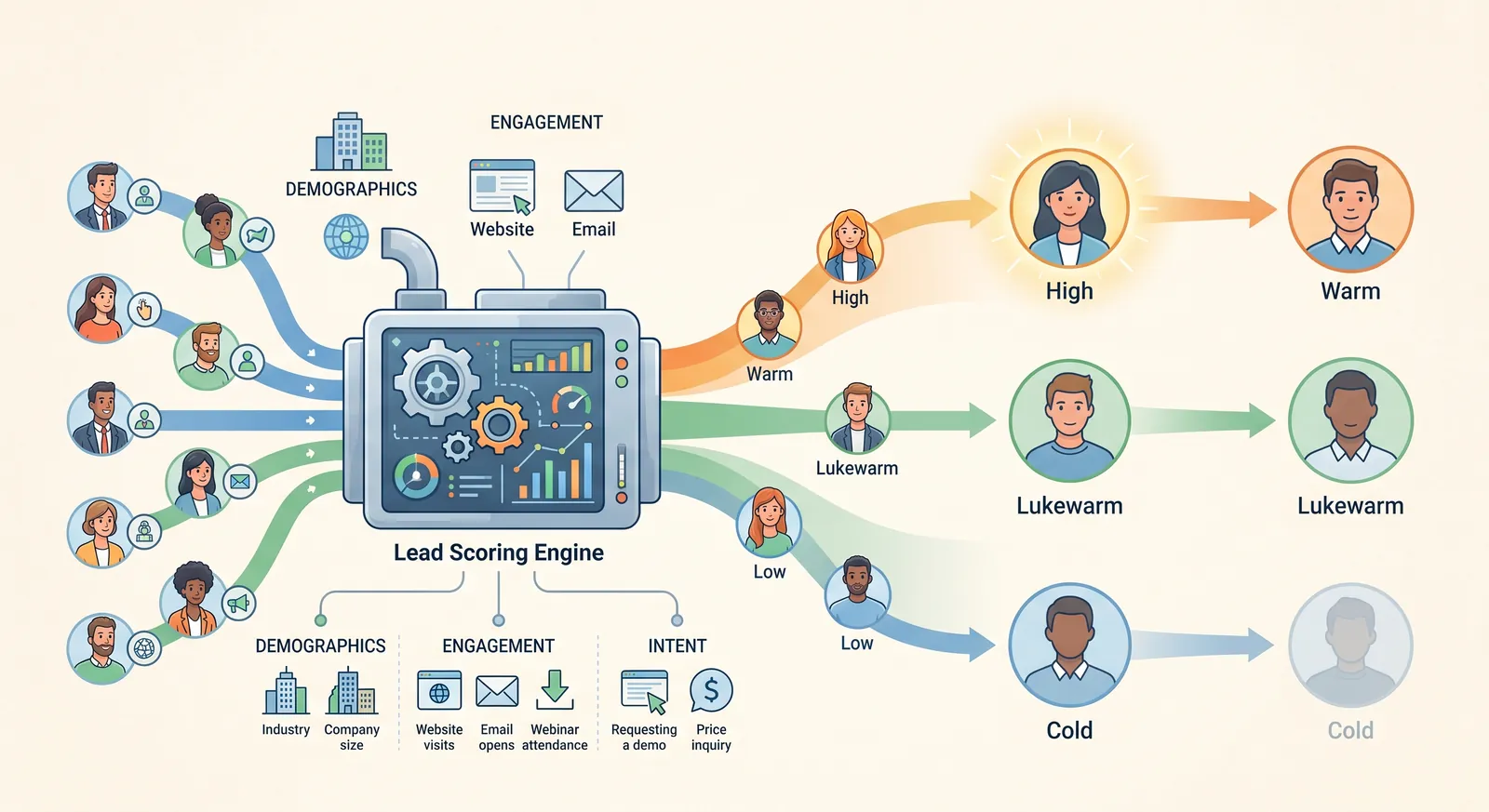
Lead scoring is a scoring model that assigns a numerical value to each prospect based on how likely they are to become a customer. The score combines two types of data: who the lead is (job title, company size, industry) and what they have done (pages visited, content downloaded, emails opened, interaction with sales). If you are wondering what lead scoring is in practical terms: it is the difference between treating all leads the same and knowing exactly who your sales team should call first.
When someone searches for what lead scoring is in marketing, they are usually trying to understand how it connects to two key funnel concepts: the MQL (Marketing Qualified Lead, a lead that marketing considers ready to hand to sales) and the SQL (Sales Qualified Lead, one that sales has already validated as a real opportunity). Lead scoring is precisely the mechanism that draws the line between the two objectively, instead of depending on each salesperson's individual judgment.
What is lead scoring for?
- It prioritizes your sales team's time. It focuses effort on the prospects with the highest real probability of buying.
- It aligns marketing and sales. Both teams share an objective, measurable definition of what a “good lead” is.
- It speeds up the sales cycle. Spotting buying-intent signals in time shortens the gap between first contact and close.
- It improves lead nurturing. Low-scoring prospects can stay in content flows instead of getting a premature sales call.
- It makes your marketing budget more efficient. It lets you identify which channels and content generate the leads that actually convert, not just the ones that generate volume.
Types of lead scoring models: manual, predictive and AI
There is no single lead scoring model; the right choice depends on each company's data maturity.
Manual scoring (rule-based)
The team defines the rules: a director earns 20 points, a visit to the pricing page adds 25, a demo request adds 50. It is transparent and easy to adjust, and it is the recommended starting point for companies with fewer than 500 closed deals in their history or highly relationship-driven sales cycles.
Predictive lead scoring
Predictive lead scoring uses statistical models (logistic regression, decision trees, neural networks) trained on historical won and lost deals to find the patterns that truly predict a conversion. Most predictive scoring tools recommend having at least 500 to 1,000 historical leads so the model has enough data to learn from.
AI lead scoring
AI lead scoring takes the predictive model a step further: machine learning identifies combinations of signals that no set of human rules would catch, like the pattern of a lead who visits the integrations page, then reads a case study and returns to the blog twice in ten days, a sequence that can point to a conversion probability several times above average. Specialized platforms already project that using smart data in lead scoring can increase conversions by around 15% and shorten the sales cycle by up to 30%.
Custom lead scoring
Neither the platform nor the algorithm defines on its own what a qualified lead is: that definition comes from the business. A custom lead scoring model combines fit logic (are they in the target market?) with intent logic (does their behavior show they are ready to buy?), weighting each signal by how much real evidence it provides about purchase probability, instead of assigning arbitrary points to every action.

How to do lead scoring step by step
If you are looking for how to do lead scoring from scratch, this is the recommended process:
- Define what a qualified lead is for your business. Talk to sales: what job title, industry or company size describes your best current customers?
- Choose your fit signals. Job title, industry, company size, location: data that shows whether the lead belongs to your target market.
- Choose your intent signals (engagement). Pricing page visits, content downloads, email opens, demo requests.
- Assign weighted points. Not all actions are worth the same: a demo request shows more intent than opening an email.
- Define the MQL-to-SQL threshold. Set the score at which a lead moves from marketing to sales.
- Test and adjust with real data. Compare high-scoring leads against the ones that actually closed, and fix the model if they don't match.
This same process answers how to run lead scoring in an orderly way: the key is not the tool you use but building the logic before automating it.

How to classify leads with lead scoring
Once the score is calculated, leads are usually grouped into simple categories so sales and marketing act consistently:
- Cold leads (low score). They fit the ideal profile poorly or have barely interacted; they stay in content nurturing flows.
- Warm leads (medium score). They show interest but don't yet give clear buying-intent signals; they receive more specific content.
- Hot leads / MQL-SQL (high score). They match the ideal profile and show strong intent signals; they are handed directly to sales.
This classification can also be reflected directly in the CRM's Lifecycle Stage (Lead, MQL, SQL, Customer), so anyone on the team can see what stage a contact is in without having to interpret the score number.
Lead scoring example
A typical lead scoring example for a B2B software company could look like this:
- Job title of Director or above: +20 points
- Company of 100 to 500 employees: +15 points
- Visit to the pricing page: +25 points
- Case study download: +10 points
- Demo request: +50 points
- Generic company email (info@, sales@): -15 points
- No activity in 60 days: -20 points
With a threshold set at, say, 60 points to move from MQL to SQL, a director at a mid-sized company who visited pricing and requested a demo would clear that threshold right away, while someone with a generic email who only downloaded a piece of content would stay in nurturing.
Automate lead scoring with your CRM
A well-configured CRM lead scoring setup turns the model into a continuous process: every new interaction updates the score automatically, without anyone having to review each contact by hand. Among the most common lead scoring applications inside a CRM are automatically assigning hot leads to the right salesperson, sending notifications when a contact crosses the SQL threshold and triggering different email sequences depending on the score level.
Automate lead scoring in HubSpot
To automate lead scoring in HubSpot, the platform offers two paths: manual scoring, available from the Marketing Hub Pro plan, where you assign positive and negative criteria to the score property; and predictive scoring, available on the Enterprise plan, where machine learning analyzes historical data to automate prioritization. HubSpot lets you set up to 25 different scoring models based on the criteria you want to evaluate, and complement them with workflows that trigger tasks, notifications or stage changes when a contact exceeds a given score.
A common mistake when setting up the model in HubSpot is adding points for every action without weighting its real relevance (five points for opening an email, ten for downloading content, twenty for requesting a demo) and then never checking whether those high-scoring leads actually have budget or decision-making power. Effective scoring in HubSpot depends on first translating the business logic, and only then turning it into properties and automations.
Database requirements for effective lead scoring
The quality of your lead scoring database determines how reliable the model will be. Before automating, it is worth checking that:
- Key fields (job title, industry, company size) are filled in for most contacts, not just a fraction.
- Won and lost deal history is labeled correctly, since it is the basis for calibrating any model, manual or predictive.
- A minimum volume of historical data exists: for predictive scoring, the general benchmark is several hundred closed deals.
- There are no duplicate or outdated contacts distorting the aggregate scores.
Content marketing and lead scoring: the connection many companies ignore
The relationship between content marketing and lead scoring is often overlooked, but it is direct: every piece of content a lead consumes is an intent signal that can add points to the model. Downloading an introductory guide is not worth the same as reading a pricing case study or a product comparison; the second type of content usually points to a much more advanced decision stage.
Designing content with lead scoring in mind (not just traffic or rankings) lets you build a more precise model: if you know what content a lead consumes before becoming a customer, you can give those pieces more weight in the scoring and, at the same time, create more of that specific type of content to move other prospects along the same path.
Frequently asked questions
How many leads do I need to implement predictive lead scoring?
As a general rule, it is recommended to have at least 500 to 1,000 historical leads with a known outcome (won or lost) so a predictive model has enough data to learn from.
Is manual lead scoring still valid in 2026?
Yes. It is the recommended starting point for companies with little data history or highly relationship-driven sales cycles, and it is still more transparent and easier to audit than a predictive model.
How often should I review my lead scoring model?
It is recommended to review the model's performance regularly, comparing high-scoring leads against the ones that actually closed, and to adjust the weight of each criterion when the pattern stops holding.
Is lead scoring only for B2B companies?
It is more common in B2B because of its long sales cycles, but it also applies to B2C with adaptations, incorporating signals like phone calls, repeat purchase behavior or interaction with support.
Turn your funnel into a model that prioritizes on its own
At Andrómeda we design lead scoring strategies connected to content and automation in your CRM, so marketing and sales work from the same definition of a “good lead.”
👉 I want to implement lead scoring in my business →
WhatsApp: +52 81 2468 7896